Install CUDA for Hashcat
This short tutorial covers how to install NVIDIA drivers and CUDA toolkit to run Hashcat with NVIDIA GPU acceleration.
Install Hashcat
Upgrade your system:
1
sudo apt update && sudo apt upgrade -y
The easiest way in Ubuntu is to install Hashcat directly from the repositories:
1
sudo apt install hashcat
Install NVIDIA Graphics Driver
Install the NVIDIA graphics driver. The following command lists available alternatives:
1
sudo ubuntu-drivers devices
Output:
1
2
3
4
5
6
7
8
9
10
11
12
13
14
15
16
17
18
19
20
21
== /sys/devices/pci0000:00/0000:00:01.1/0000:01:00.0 ==
modalias : pci:v000010DEd00001F99sv000017AAsd00003A43bc03sc00i00
vendor   : NVIDIA Corporation
model    : TU117M
driver   : nvidia-driver-535 - third-party non-free
driver   : nvidia-driver-470-server - distro non-free
driver   : nvidia-driver-525-server - distro non-free
driver   : nvidia-driver-535-server - distro non-free
driver   : nvidia-driver-550 - third-party non-free recommended
driver   : nvidia-driver-535-server-open - distro non-free
driver   : nvidia-driver-545 - third-party non-free
driver   : nvidia-driver-450-server - distro non-free
driver   : nvidia-driver-525 - third-party non-free
driver   : nvidia-driver-520 - third-party non-free
driver   : nvidia-driver-550-open - third-party non-free
driver   : nvidia-driver-515 - third-party non-free
driver   : nvidia-driver-535-open - distro non-free
driver   : nvidia-driver-470 - distro non-free
driver   : nvidia-driver-545-open - distro non-free
driver   : nvidia-driver-525-open - distro non-free
driver   : xserver-xorg-video-nouveau - distro free builtin
Choose the latest version, in this case nvidia-driver-550:
1
driver   : nvidia-driver-550 - third-party non-free recommended
Install the driver:
1
sudo apt install nvidia-driver-550
Install CUDA Toolkit
Download and install the CUDA toolkit. Refer to the official CUDA downloads page for the latest version.
1
2
3
4
wget https://developer.download.nvidia.com/compute/cuda/repos/ubuntu2204/x86_64/cuda-keyring_1.1-1_all.deb
sudo apt install ./cuda-keyring_1.1-1_all.deb
sudo apt update
sudo apt install cuda-toolkit-12-4
Add CUDA to your PATH by adding the following to .bashrc or .zshrc:
1
2
export PATH=/usr/local/cuda/bin${PATH:+:${PATH}}
export LD_LIBRARY_PATH=/usr/local/cuda-12.4/lib64\${LD_LIBRARY_PATH:+:${LD_LIBRARY_PATH}}
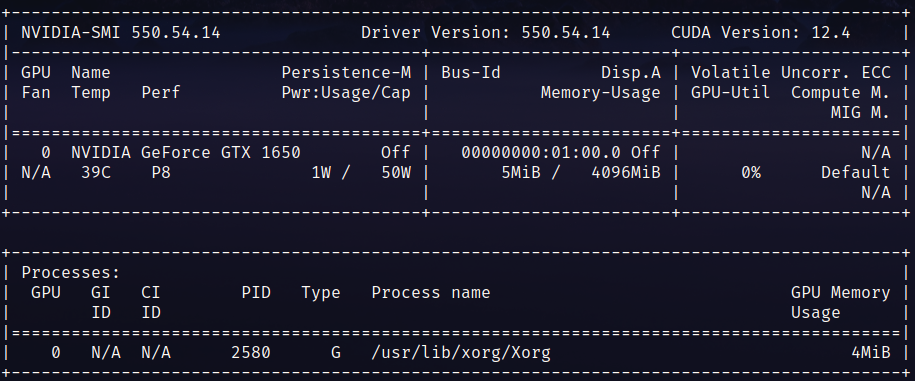
Reboot the system, then verify the installation with nvidia-smi. CUDA version should be displayed:
Verify CUDA installation:
1
nvcc -V
Expected output:
1
2
3
4
5
nvcc: NVIDIA (R) Cuda compiler driver
Copyright (c) 2005-2024 NVIDIA Corporation
Built on Tue_Feb_27_16:19:38_PST_2024
Cuda compilation tools, release 12.4, V12.4.99
Build cuda_12.4.r12.4/compiler.33961263_0
export PATH=/usr/local/cuda/bin${PATH:+:${PATH}} export LD_LIBRARY_PATH=/usr/local/cuda-12.4/lib64${LD_LIBRARY_PATH:+:${LD_LIBRARY_PATH}}
1
2
3
4
5
6
7
8
9
Reboot the the system, and after this execute `nvidia-smi`, to verify the correct installation, CUDA Version should look like the following image

**Output**
```shell
nvcc -V
Finally you should be able to execute
1
2
3
4
5
nvcc: NVIDIA (R) Cuda compiler driver
Copyright (c) 2005-2024 NVIDIA Corporation
Built on Tue_Feb_27_16:19:38_PST_2024
Cuda compilation tools, release 12.4, V12.4.99
Build cuda_12.4.r12.4/compiler.33961263_0
Testing Hashcat
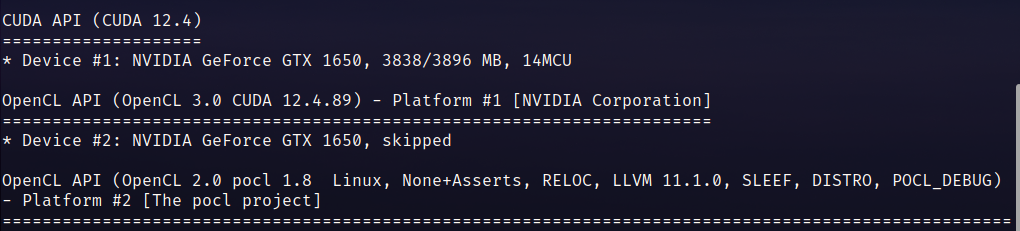
Verify Hashcat now runs without errors using GPU acceleration:
1
hashcat --benchmark